VST plugins now run in DaVinci Resolve on Linux
Resolve's Linux build has no VST support. None. So I wrote the host it's missing, and now VST2, VST3 and CLAP plugins load straight into Fairlight. It's open source, it works, and a few things are still broken.
In this article7
TL;DR
Not an energy article. Filed under tech, nowhere near the battery stuff.
If you run DaVinci Resolve on Linux, you can't load VST plugins. There's no setting for it. There's no Studio-only unlock. The plugin host just isn't in the Linux build. I got tired of that and wrote one, and the code's on GitHub.
Does DaVinci Resolve support VST plugins on Linux?
No. Blackmagic's manual says VST is macOS and Windows only, and the Fairlight effect menu on Linux backs that up: their plugins, nothing else. No VST, no VST3, no CLAP, no LV2.
I wanted to be sure it wasn't just switched off, so I grepped the whole install for VSTPluginMain
and GetPluginFactory. Anything that loads a VST has to call one of those. Zero hits. Not in the
binary, not in any library, nowhere under /opt/resolve. It was never compiled in.
Why I cared enough to fix it
I cut video for a living. Client work, mostly. A few months back Windows finally wore me down and I moved the whole setup to Linux, Resolve included.
Most of it came across fine. Audio didn't. Every clip that needed a plugin I don't have natively meant: export it, open something else, fix it there, render, bring it back. Then the client asks for a change forty seconds earlier in the timeline and you do the whole dance again.
That was the one thing still making me think about a Windows partition.
So I wrote the host
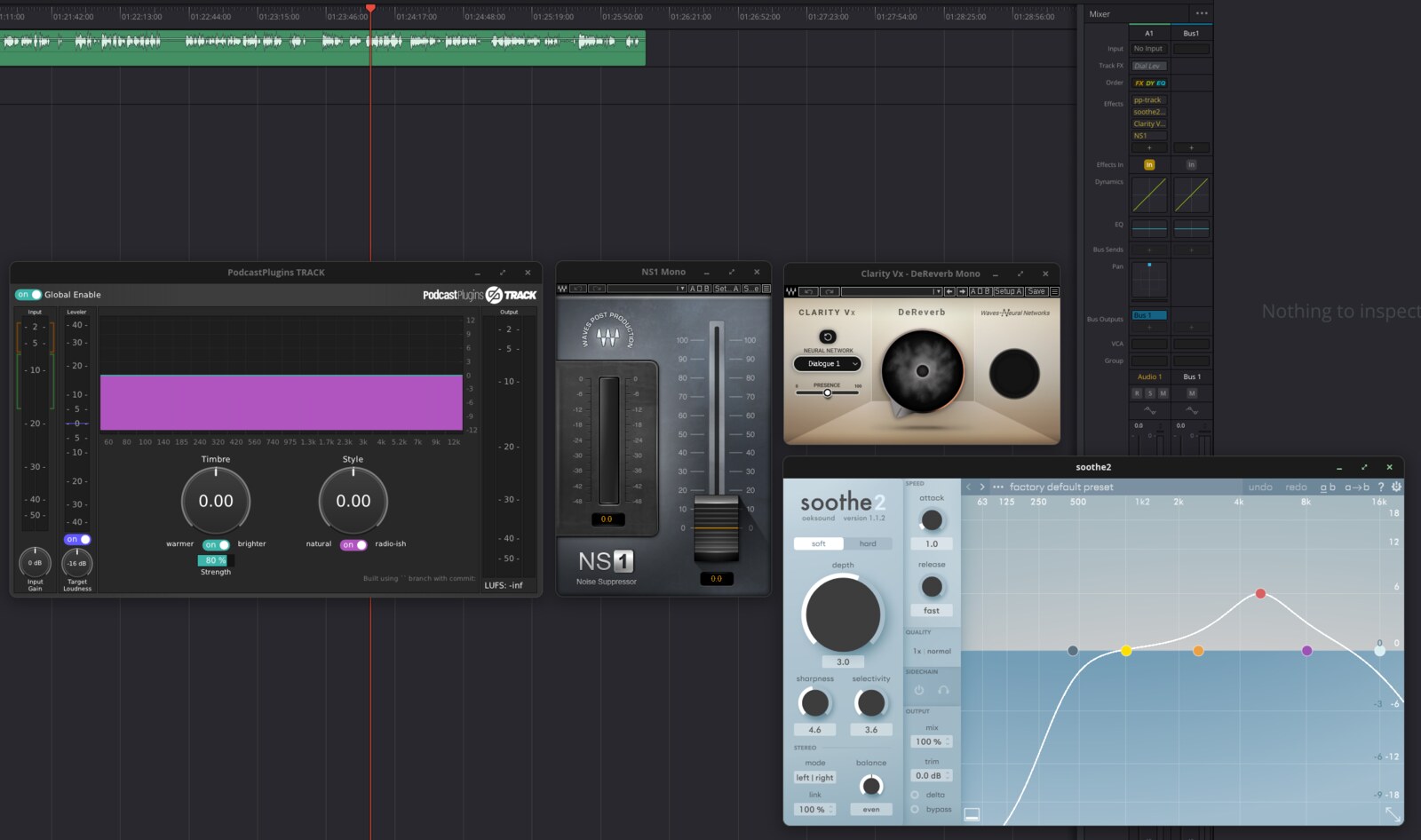
That's four plugins running at once on one track. Check the Effects column in the mixer:
pp-track, soothe2, Clarity Vx, NS1. Real plugins, real audio, own windows, sitting on top of
the timeline like they belong there.
They also land in the right categories.
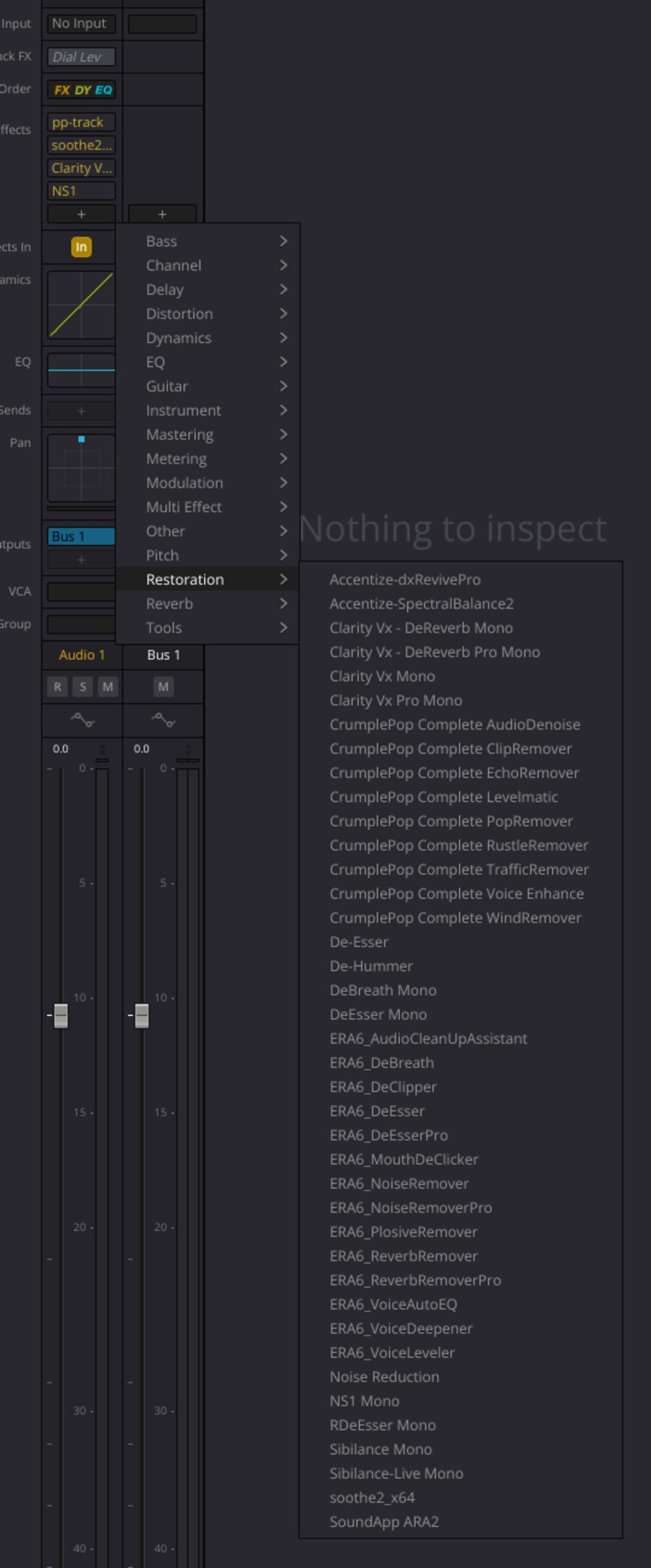
De-Esser, De-Hummer and Noise Reduction in that menu are Blackmagic's. The rest are mine.
Resolve can't tell the difference.
130 plugins show up on my machine. 75 of those come out of one Waves file that publishes 718 of them, cut down by a text file to the ones I actually use.
How it works, roughly
Resolve loads its own Fairlight effects through a private plugin interface. Undocumented, but it's right there: it reads a path from a config file, loads whatever library it finds, and asks it what effects it has.
So I gave it mine.
It registers through that same interface, adds a menu entry per plugin it finds on disk, and when you pick one it loads the actual VST2, VST3 or CLAP behind it. Every effect gets its own buffers, its own window, its own instance of the plugin. Windows plugins go through yabridge, which already had that part solved.
Audio was the easy bit, honestly. What ate the time was everything else. Editor windows that wouldn't behave. One plugin crashing and taking Resolve down with it. And figuring out where an effect's category comes from, which turned out to be a compressed lookup table baked into the binary, keyed by plugin name. Four approaches failed before one stuck.
What's still broken
- Two plugins draw their UI, then ignore the mouse completely. Smooth Operator Pro and Accentize SpectralBalance2. Not my bug though: Carla, a totally separate host, does the same thing with both.
- Sometimes a plugin window opens blank. Remove the effect, hit undo, and it comes back fine. No idea why yet.
- Resolve doesn't always shut down cleanly with this loaded.
- No separate "VST" section in the menu like Mac and Windows get. That grouping comes from the plugin type and Linux Resolve doesn't have a VST type, so categories work but that section can't.
- One machine. Mine. That's the whole test matrix.
Also worth saying: this pokes around inside a running program. It can crash Resolve mid-edit. Save often.
Is this even legal?
Short version, yes, and here's why I think so.
Nothing of Blackmagic's gets copied, redistributed or modified. No file in the install is touched. It loads through Resolve's own plugin path, the same one their effects use, and anything it changes it changes in memory, in its own process, while running. Delete one file and it's gone.
No Steinberg code either. VST3 goes through travesty, which is an independently written description of the interface, and VST2 uses one I wrote myself. Steinberg pulled the VST2 kit in 2018 and stopped handing out licences, so their headers were never on the table anyway.
This is interoperability work: getting one program to talk to a plugin format its maker skipped on one platform. The EU wrote a law for exactly this, Directive 2009/24/EC Article 6. Resolve's licence agreement is its own separate question and you should read it and decide for yourself.
And nothing stops Blackmagic doing this properly. The VST3 SDK went MIT. No contract, no fee, no per-platform terms. Linux support is a decision they haven't made, not a wall they've hit. If they ship it, I'll bin this happily.
The code
VSTForResolveLinux on GitHub. MIT, build instructions in the readme, plus the full engineering log with every dead end still in it. The dead ends taught me more than the working code did.
There's a release with a compiled binary if you'd rather not build it. One file into one directory, one line into a config file, restart Resolve. Uninstalling is deleting the file.
Cutting that release found a bug I'd already shipped. glibc 2.34 folded pthreads into libc, and this machine runs 2.44, so the library linked here without ever asking for pthreads by name. On Ubuntu 20.04, Debian 11 or Rocky 8 it would've built fine and then refused to load. My build script has a check for exactly that failure, and it passed, because it checks the machine doing the building. I compiled it inside an Ubuntu 20.04 sandbox and the missing symbol turned up in about a second.
Parts of this were written with an LLM in the loop. Source and binary are both up there, free.
If someone's already done this and I missed it, tell me and I'll credit you. I searched GitHub's code index and the usual forums and came up empty, but "I didn't find it" isn't the same as "it doesn't exist".
For me this closes one of the last gaps. Linux does the whole edit now, audio included. Adobe's Creative Cloud is what's left, and that's a different fight.
